Windows 64-bitVST3 + standaloneoffline license
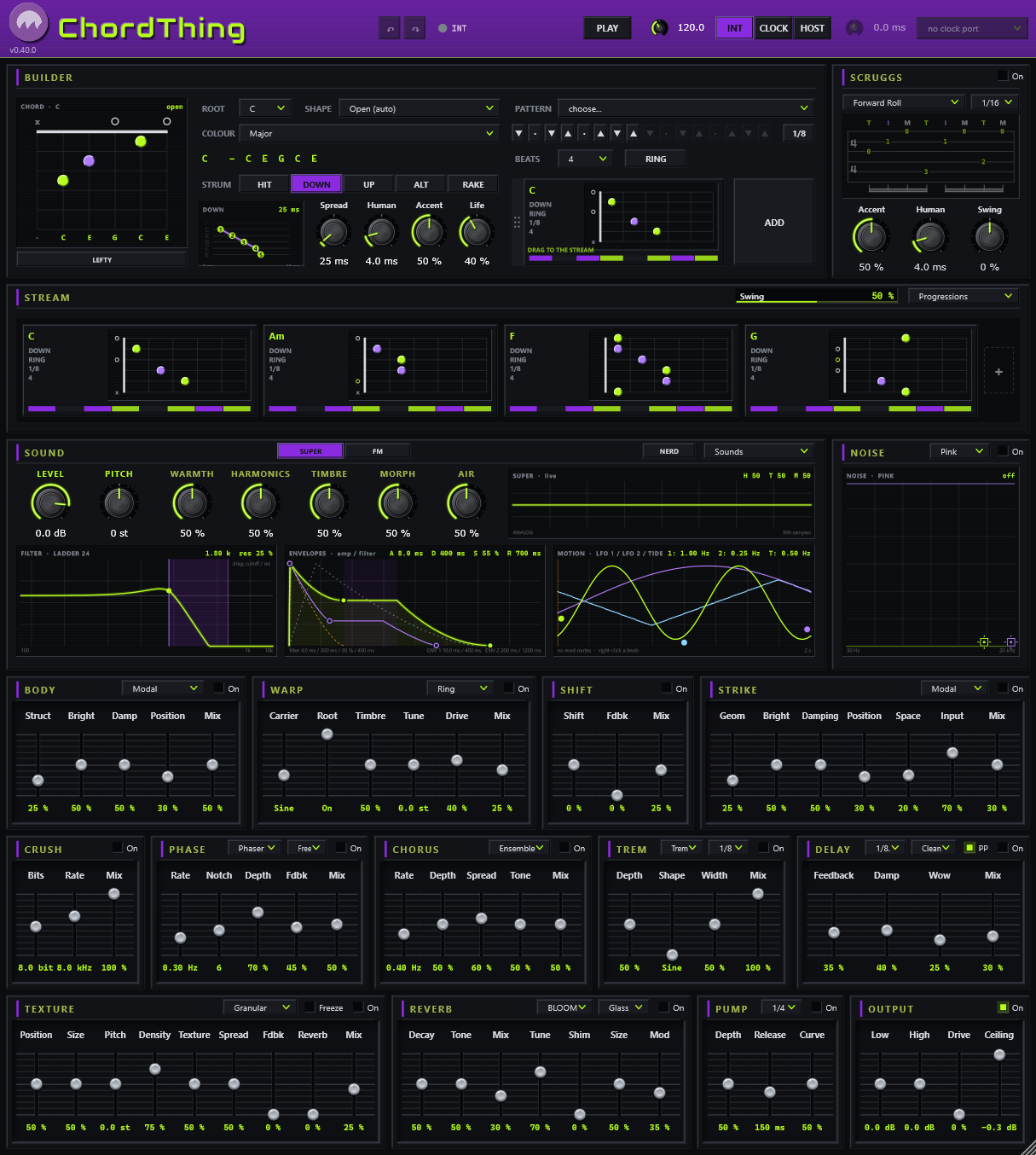
ChordThing is a chord synth for the guitar-brained. Pick a chord on a fretboard, give it a strum or a finger roll, build a progression in the stream and watch it flow. Under it sits a full synth with two engines, a modulation router and thirteen effects in the order the signal meets them. Play along over it, write over it, or use it as the band.
C:\Program Files\Ill Sea\ChordThing unless you change it) and the VST3 plugins in your VST3 folder
(C:\Program Files\Common Files\VST3 unless you change it). Rescan plugins in your DAW. The standalone
ChordThing runs on its own, no DAW needed: open it from the Start menu and pick your audio device under
Options > Audio/MIDI Settings.| Control | What it does |
|---|---|
| Ill Sea logo / name | Click the logo, or right-click the ChordThing name, for the menu: License (who it’s licensed to, Load license file..., Get licensed / free trial); in a DAW also the colour schemes, the manual and Check for updates.... The version sits under the logo. |
| DEMO block | Only on an unlicensed copy: a black block over the name with the demo minutes left this session (MUTED once they run out). Click it to load a license file or get one. A licensed or trial copy shows nothing here. See License and demo. |
| Master | The volume of the whole output, left of undo. A session keeps it; no sound carries it, so it stays where you set it as you change sounds. |
| ↶ ↷ | Undo and redo. Also Ctrl+Z, and Ctrl+R / Ctrl+Y / Ctrl+Shift+Z. |
| Status | The light and the line beside it say what the clock is doing: INT, HOST rolling or parked, CLOCK locked or waiting. |
| PLAY | Starts and stops the stream (in INT, and in HOST while the host is stopped). |
| BPM | The tempo when ChordThing is its own clock. |
| INT / CLOCK / HOST | Where the tempo and the start come from. See Tempo and sync. |
| ms | Clock offset: nudges the stream earlier or later against an external MIDI clock. |
| Port | The MIDI input the CLOCK mode listens to (standalone). |
Double-click the header band to make the window fill your screen's height (again to shrink it back).
The cutter is where one chord is made. Whatever it shows is the selected plate in the stream: every change lands on that plate (and on every other selected plate, see The stream). With nothing selected the cutter is a scratchpad you can drag into the stream.
A chord's strum is how the strings are hit; its pattern is when.
The stream is the song: chord plates side by side, each as wide as its length. Up to eight fill the lane; more than eight scroll, with arrows at the ends. While it plays, the lane follows the playhead.
A chord change releases the chord before it. At every plate boundary the strings still ringing fade out on the sound's own Release (and ChordThing MIDI sends their note-offs); the new plate's strum or roll strikes its own strings. Nothing rings past its chord. Within a plate, the life of a note is the sound's AMP envelope: Sustain down gives a plucked note that fades on its own, Sustain up a note that holds until the next strike or the chord change.
| Do this | To |
|---|---|
| Click | Select a plate (the cutter shows it). |
| Ctrl+click | Add a plate to (or take it out of) the selection. An edit in the cutter lands on every selected plate. |
| Shift+click | Select every plate from the selected one to this one. |
| Ctrl+A | With a plate selected, select every plate. |
| Drag | Move a plate. |
| Ctrl+drag | Copy a plate (or the touching group it belongs to). A ghost follows the mouse; drop it where the marker shows. |
| Right-click | Duplicate, ring or choke into the next chord, Group these (a touching selection becomes a group: a thin bracket under its plates; Ungroup on any of them dissolves it; a duplicated group is its own group), Transpose (the chord, or every chord in the selection, up or down by one to eleven semitones; a solved voicing is solved again on the new root, a hand-made one slides whole along the neck), delete. A selected group that is all touching duplicates whole, in order, after its last plate; a group with gaps cannot be duplicated (the item is greyed). |
| x / + | The little x on a plate deletes it. The + at the end adds the cutter's chord. |
Swing pushes the off-beats late (or early). Progressions loads a factory progression, grouped by mood, or one you saved.
SCRUGGS sits beside the cutter. Switch it On and every chord in the stream is picked instead of strummed, in a repeating 8-step roll. While it is on, the cutter's strum options the roll does not use (the type, the pattern and its cells, the division, Spread, Human and Accent) deselect and grey out; Life still rides the roll's notes. Switch it off and nothing about your stream has changed.
Two engines, chosen at the top of the SOUND card: SUPER, a model-based synth voice (analog shapes,
strings, bars, plucks, particles and more, plus a second oscillator), and FM, a six-operator FM voice that
also loads .syx banks (LOAD .SYX). Its levels, envelopes, key scaling, velocity, feedback, LFO and
pitch envelope follow the original hardware’s measured tables, so a bank sounds as it was voiced; MK I (in NERD’s
ENGINE header) adds the first hardware’s output character, a floating-point converter that grits up quiet tails and its
15 kHz roll-off.
SUB (in the SOUND card, beside MOTION) puts a simple wave under the chord, the way most synths do: Sine, Tri or Square, an octave or two down, through the string's own filter and envelope. Strings picks how many strings carry the sub, counted from the low E: 1 is the E, 2 is E and A, 3 adds the D, 6 is every string; a string the chord mutes has no note and so no sub. Drive adds harmonics. The Pitch pot is the line's pitch control: click its label to change the feel: OCT snaps to octaves, 5TH to fourths and fifths, FINE moves by cents.
NOISE adds coloured noise to every string of the voice, before the filter, so it breathes with the sound: air on a pad, a pick's scrape, a hammer, dust, surf. The colour is picked in the device's header: white, pink, brown, blue, violet, or crackle. On, beside it, switches the noise in and out; Off is silent and keeps every setting, and switching On with the level at zero starts it at a level you can hear. The screen shows the noise's spectrum and its decay, with two nodes you drag anywhere:
Hold Shift while dragging for fine moves. Double-click a node to reset it (green: 6 kHz at 15 %; purple: broad and held). Right-click a node to modulate or MIDI-learn either of its two controls.
The NERD button opens a window with every control of the voice, laid out in rows:
Right-click any knob or slider to route a modulation source to it, at any amount, positive or negative. The sources: LFO 1, LFO 2, ENV 1 and ENV 2 (they restart on every strum), TIDE (a shaped, smooth cycle), DICE (a new random value every step), OSC A and OSC B (the two oscillators' own envelopes), and VELO (how hard the last strum or pick was, held until the next — route it to the cutoff or a timbre and a hard strum gets brighter). A routed control shows a coloured band of its range and a tick where it is right now. Alt+drag a routed control to trim its amount. The ROUTES list in NERD shows them all: click a name to open its menu, x removes it.
Right-click an effect’s name (BODY, WARP, SWIRL...) for two more: Randomize Effect Modulation gives every slider on that effect one route from a random source at a random amount (10 to 50 %, up or down), replacing what was there; Remove all Modulation clears every route on that effect. Each is one undo step.
Eleven devices, read left to right and top to bottom in the order the signal meets them. The colour that is different per string runs inside each string's voice: STRING (its body, strike, FM and chew). Everything else runs once on the stereo mix: MOUTH, SWIRL, ENSEMBLE, ECHO, GRAINS, SPACE, DIRT, WOBBLE, DUCK and MASTER. Each has an On switch; switching fades in and out rather than cutting.
| Device | What it is |
|---|---|
| STRING | Each string's own body, strike, FM and chew, together: Strike (a pick-like burst at every note-on, crossfaded with the oscillator: 0 the oscillator alone, 1 the struck body only), Body (the string's resonator from off to long bright strings; the header picks Modal or Strings), FM (ring modulation against a carrier at the string's own pitch plus Pitch: click its label for octaves, fifths or cents), Chew (a fold, then an XOR, then bits as it rises). |
| DIRT | Four kinds of dirt stacked, each a slider that is off at 0: Crush (the sample rate held down and the word cut, on one path), Tape (a cassette: codec, a wobbling transport and hiss), Shift (a frequency shift down or up with a touch of regeneration: a shimmer to a barber-pole), Drive (a soft saturator); one Mix. |
| MOUTH | A mouth on the mix. Vowel morphs three formants from A through E, I, O to U; Open goes from closed and dull to open and singing; Breath adds a whisper that rides the chord's own envelope; Talk makes the mouth follow the chord's envelope (the auto-wah gesture without a route); Mix. The header switches to Filter: one low-pass, Vowel its cutoff. Route an LFO, the tide or an envelope to Vowel for talking chords. |
| SWIRL | The ensemble and a sweep together: Swirl (the ensemble's depth, voices and spread on one path), Sweep (the phaser or flanger's depth; 0 is off), one Rate for both (free, or synced to a division up to four bars by the header's menu), Color (the sweep's regeneration) and Mix. The header picks the sweep's engine: Phaser or Flanger. |
| ENSEMBLE | The ensemble chorus on its own, after the dirt: Rate (how fast its voices sweep), Depth (how far; the stereo spread rides it) and Mix. |
| ECHO | One delay. Time runs free from 10 ms to 2 s; moving it, or modulating it, bends the repeats the way tape does (the header's menu snaps it to a division instead). Repeats goes past 100 % into a soft-limited self-oscillation, Tape is wow, darkening and saturation together, Width takes the repeats from where the chord sits to ping-pong; Mix. |
| GRAINS | A granular processor on the mix. Seed says where grains come from: Free (the Density clock; centred is silence), Hits (every strum and roll step of the stream: one grain with Burst centred, a burst off-centre) or Clock (a tempo division, every tick). Memory is Clean (48 k, 16-bit, 4 s) or Tape (24 k, 12-bit, 8 s, with wow and flutter). Time is where in the memory grains are read, Size their length (up to 4 s, backwards at the bottom), Pitch their transposition (click the label: octaves, fifths or fine), Chance how far each one strays from the knobs. Freeze holds the memory; space comes from SPACE. |
| SPACE | One ambient tank with two faces, picked by the menu beside On. Wither: Smear is the tank's motion and its lid (a clean hall at 0, a misty wash at 1). Flower: the bloom as it was, lid open, and Smear is its octave-up shimmer, the tail blooming upward. On both, Size scales every line, Decay is the tail's length, Tone its darkness, Tune makes the tail ring in the chord's notes; Mix. |
| WOBBLE | A resonant low-pass swept on a division of the beat: Rate the division, Depth how far the sweep climbs (five octaves at the top), Res the filter's resonance, Shape the sweep from a sine to a square, and Mix. The auto-wah and the wobble bass in one slot. |
| DUCK | The pump: the level drops and recovers (Depth, Release, Curve) on every division while playing (Beat, the breathing pad) or on every strum or pick (Hits — the pick passes, the body ducks and recovers). |
| MASTER | Low and high shelves and a ceiling limiter. Always last. |
Right-click a control and choose MIDI learn, then move a knob or press a button on your controller. Learned mappings are remembered on this computer.
Everything you save lives in %APPDATA%\IllSea\ChordThing\, in folders named Sounds,
Progressions, Patterns and Rolls: one small file each, easy to back up or
share. Your session (the stream, the sound, the roll) is saved with your DAW project, and by the standalone when
it closes.
ChordThing.chordthing-license. Once ChordThing is installed,
double-click the file: ChordThing opens, licensed. Only using the plugin? Drag the file onto ChordThing's window, or
open the License menu (Options > License in the standalone; in a DAW, click the Ill Sea logo or
right-click the ChordThing name) and choose Load license file....
It works offline, forever, on all your computers.ChordThing MIDI is ChordThing without its own sound: the cutter, SCRUGGS, the patterns and the stream play
any instrument instead, as MIDI notes with the same timing, strums, rolls and humanising. It comes with your
ChordThing license (the same file unlocks both). It installs as its own plugin, ChordThing MIDI.vst3, and
its own standalone, ChordThing MIDI.exe.